Revenue Recognition for Dues
Last updated: October 20, 2026
Learn the different ways associations recognize dues revenue and which approach may fit your organization.
No single revenue recognition process works for every association. Across the Novi community, organizations use a variety of approaches. Some recognize dues when a membership term begins. Others recognize a portion each month. Some maintain detailed revenue recognition schedules in QuickBooks, while others use spreadsheets and monthly journal entries.
Your CPA, auditor, or accounting team should determine the appropriate accounting treatment for your organization. Novi can then help you understand how that approach works with Novi AMS and QuickBooks.
Start With the Accounting Policy
Before choosing a tool or workflow, answer the more fundamental question:
When does your organization consider dues revenue to be earned?
Common approaches include:
Recognizing dues evenly throughout the membership term.
Recognizing dues when the membership term begins.
Recognizing revenue according to when specific member benefits are provided.
Recognizing dues only after you receive payment.
Once you know when to recognize the revenue, you can decide how to manage the accounting.
How Dues Flow From Novi to QuickBooks
Understanding how Novi's dues configuration connects to your accounting helps.
In Novi:
A Member Type contains one or more Dues Rules.
Each Dues Rule is mapped to a QuickBooks Product or Service, sometimes simply called a QuickBooks item.
That QuickBooks Product or Service is associated with an account in QuickBooks.
In other words:
Member Type → Dues Rule → QuickBooks Product/Service → QuickBooks Account
That last step is especially important for revenue recognition.
Depending on the approach your organization uses, the QuickBooks Product or Service may post directly to an income account, to a deferred revenue liability account, or may be configured to use QuickBooks native revenue recognition.
This allows different types of dues to follow different accounting treatments when appropriate.
Which Approach Fits Your Organization?
Here is a starting point:
If your organization... | Consider... |
|---|---|
Wants a detailed revenue recognition schedule for individual transactions inside QuickBooks | QuickBooks native revenue recognition |
Wants to recognize dues over time but maintain the calculation outside QuickBooks | Deferred revenue with a spreadsheet and monthly journal entries |
Recognizes annual dues when the membership term begins | Recognition at the start of the membership term |
Recognizes dues only after they are paid | Payment-based recognition using cash-basis QuickBooks reporting |
Has complex performance obligations or revenue that varies based on benefits delivered | A customized process developed with your CPA or auditor |
These approaches are not mutually exclusive. An organization may use different methods for different types of revenue.
Option 1: QuickBooks Native Revenue Recognition
Organizations using QuickBooks Online Advanced or Intuit Enterprise Suite can choose to use QuickBooks native revenue recognition functionality.
This option may be particularly useful for organizations that want QuickBooks to maintain a detailed revenue recognition schedule for individual transactions.
For example, an association could configure a $1,200 annual dues charge to recognize $100 during each monthly period of a 12-month membership term.
QuickBooks can:
Create reusable revenue recognition templates.
Associate templates with Products and Services.
Automatically create schedules for qualifying transactions.
Track recognized and deferred revenue.
Automatically post revenue according to the schedule.
Allow accounting users to review and adjust individual schedules.
See It in Action
Intuit provides a short walkthrough showing how to turn on revenue recognition, create a template, assign it to a Product or Service, create a transaction, review the recognition schedule, and use the Revenue Recognition Report.
Watch: How to use revenue recognition in QuickBooks Online Advanced
Novi and Service Dates
Novi sends a Service Date on transaction lines sent to QuickBooks. QuickBooks uses the Service Date when determining when a recurring revenue recognition schedule begins.
Novi assigns the Service Date based on the transaction:
Membership: First day of the membership term
Events: First day of the event
E-commerce: Day of the sale
This gives QuickBooks a date that reflects when the underlying service begins, regardless of when the transaction itself was created.
Things to Consider
There are a few important workflow considerations when using QuickBooks native revenue recognition with Novi:
Dues invoice recalculations: If a dues invoice contains at least one line item configured for QuickBooks revenue recognition, Novi will not perform a subsequent dues recalculation on that invoice. Novi will treat it like an invoice edited directly in QuickBooks.
Non-renewals and credits: Novi's Non-Renew & Credit functionality will continue to work, but you may also need to review or adjust the revenue recognition schedule associated with the original invoice in QuickBooks. Novi will soon provide a list of transactions that may need review, so your accounting team does not have to identify them on its own.
Payment status: QuickBooks recurring revenue recognition follows accrual accounting principles. Revenue is recognized based on the service period in which it is earned rather than when the dues invoice is paid.
If this approach sounds appropriate for your organization, see Using QuickBooks Revenue Recognition with Novi AMS for setup instructions, examples, and detailed information about how QuickBooks and Novi work together.
Option 2: Deferred Revenue With Monthly Journal Entries
QuickBooks native revenue recognition is one way to recognize dues over time, but it is not the only approach.
Many associations use a traditional process in which dues initially post to a deferred revenue liability account. The accounting team then calculates how much revenue has been earned and moves that amount to income through a monthly journal entry.
For this approach, each Novi Dues Rule should be mapped to the appropriate QuickBooks Product or Service, and that Product or Service should post to a deferred revenue liability account.
A common workflow is:
Configure the appropriate Dues Rules within each Member Type.
Map each Dues Rule to the appropriate QuickBooks Product or Service.
Configure those Products and Services to post to the appropriate deferred revenue liability account.
Each month, run the Sales by Product/Service Summary report in QuickBooks using the accrual accounting method. Set the report period to the month you are adding to your revenue recognition calculation.
Use the totals for the applicable dues Products and Services to update your revenue recognition spreadsheet.
Use the spreadsheet to calculate the amount of deferred dues revenue that should be recognized for the month.
Create a monthly journal entry that debits deferred revenue and credits the appropriate dues income account.
Calendar-Based Memberships
This process can be relatively straightforward when most members share the same membership term.
For example, if nearly all memberships run from January 1 through December 31, much of the year's dues activity follows the same recognition period.
The accounting team may be able to calculate and recognize the revenue collectively without maintaining an individual schedule for every member transaction.
Learning From Your Peers
Mark Sullivan, Controller for the Atlanta Apartment Association, developed a Deferred Dues Realization Report for this type of workflow and shared it with the Novi community.
You can also hear Mark and other Novi customers discuss their revenue recognition practices in our Novi revenue recognition deep dive.
Watch the Novi Revenue Recognition Deep Dive
Resources from the Atlanta Apartment Association:
How to Use the Report
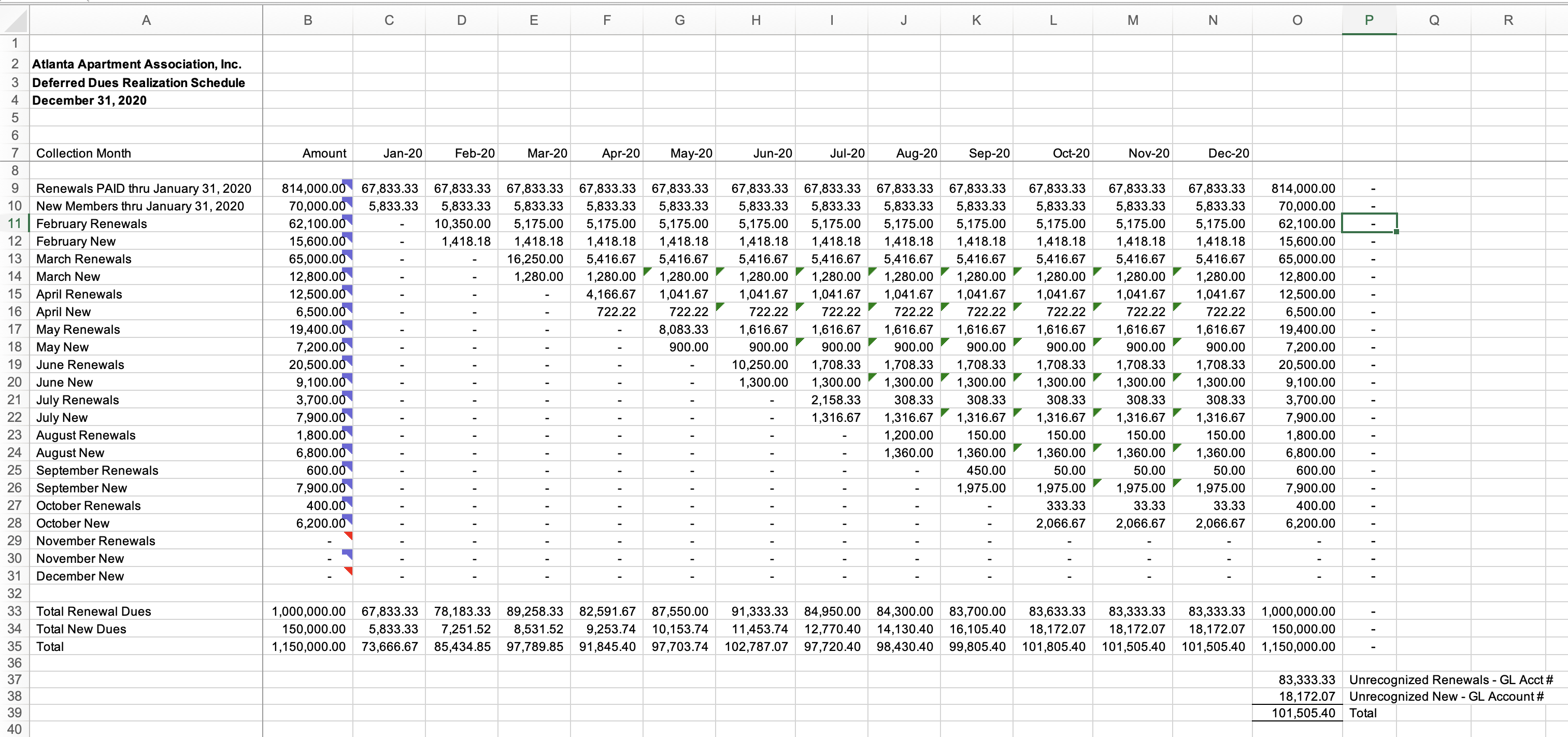
Each month, use the Sales by Product/Service Summary report in QuickBooks (run on an accrual basis) to determine the dues activity to add to the spreadsheet.
In the Deferred Dues Realization Report:
Rows 10–31 represent new and renewal dues activity by month.
Enter the applicable dues totals in Column B ("Amount").
The spreadsheet formulas automatically spread those amounts across the appropriate recognition periods.
Rows 33 and 34 show the amount of new and renewal dues revenue to recognize each month.
If you do not track new and renewal dues separately, use Row 35 for the combined amount.
Use those calculated totals to prepare the monthly journal entry that debits deferred revenue and credits the appropriate dues income account.
Report Tips
Save a new copy of the report each month so you maintain a historical snapshot of the calculations supporting each journal entry.
Customize the spreadsheet to fit your accounting process. For example, you can use the cells beneath each month to record the corresponding QuickBooks journal entry number.
If your organization uses a common renewal date other than January 1, the same approach can be used by adjusting the recognition periods in the spreadsheet.
A huge thank you to Mark Sullivan and the Atlanta Apartment Association for sharing this report with the Novi community.
Anniversary-Based Memberships
The same accounting process works for anniversary-based memberships, but the calculation becomes more layered.
When members renew throughout the year, each month's dues activity begins a different recognition period.
For example:
Memberships beginning in January may be recognized from January through December.
Memberships beginning in June may be recognized from June through the following May.
Memberships beginning in October may be recognized from October through the following September.
The spreadsheet therefore needs to maintain overlapping deferred-revenue groups, or cohorts.
The underlying accounting is the same. The difference is simply that the calculation becomes more involved as the number of overlapping membership terms increases.
We also have a sample spreadsheet designed for this type of calculation:
Download the Sample Deferred Dues Revenue Calculator
Organizations with substantial anniversary-based dues activity may want to compare the manual work this method requires with QuickBooks native revenue recognition.
Option 3: Recognize Dues When the Membership Term Begins
Not every organization needs to spread dues revenue across the membership term.
Some organizations recognize the full amount of annual dues when the new membership term begins.
For this approach, the QuickBooks Product or Service mapped to the Novi Dues Rule typically posts directly to the appropriate dues income account, rather than to a deferred revenue liability account.
Because QuickBooks records revenue based on the invoice date, many Novi customers using this approach set the invoice date to the first day of the new membership term.
For example, an association with a January 1 through December 31 membership year might:
Map its Novi Dues Rules to QuickBooks Products or Services that post directly to dues income.
Configure renewal transactions to be dated January 1.
Allow QuickBooks to recognize the full dues amount on January 1, when the new membership term begins.
In Novi, set the renewal transaction date to the first day of the new term.
This approach avoids maintaining deferred revenue schedules or monthly revenue recognition journal entries. It may be appropriate when your organization's accounting policy is to recognize the full dues amount at the beginning of the membership term.
Confirm with your CPA, auditor, or accounting team whether this approach is appropriate.
Option 4: Recognize Dues Only After Payment
A smaller number of Novi customers use an accounting methodology under which dues revenue is recognized only after the member has paid.
This is sometimes based on the position that a renewal invoice represents an offer to renew rather than an unconditional receivable.
For organizations using this approach, the key QuickBooks report is the Sales by Product/Service Summary report, run on a cash basis.
A common workflow is:
Map each Novi Dues Rule to the appropriate QuickBooks Product or Service.
Configure those Products and Services to post to the appropriate deferred revenue liability account.
Each month, run the Sales by Product/Service Summary report in QuickBooks.
Set the accounting method to Cash and the report period to the month being reviewed.
Use the totals for the applicable dues Products and Services to determine the dues associated with payments received during that period.
Use those totals to prepare the journal entry that debits deferred revenue and credits the appropriate dues income account.
The key distinction is that the cash-basis report reflects dues associated with payments received, not the dues invoices created.
This differs from QuickBooks native revenue recognition, which follows the service period under accrual accounting and does not wait for payment.
If your organization begins providing membership benefits before receiving payment, discuss with your CPA or auditor whether payment-based revenue recognition is appropriate.
Some organizations may instead use an allowance for doubtful accounts to account for dues invoices that ultimately go unpaid.
Organizations with significant non-renewal activity may also choose a member-initiated renewal process rather than automatically creating renewal invoices for every member.
Revenue Recognition Beyond Membership Dues
Although this article focuses primarily on dues, membership revenue is not the only type of association revenue that may need to be deferred.
Depending on your accounting policy, other examples may include:
Event registrations sold before the event takes place
Sponsorships associated with a future event or benefit period
Exhibitor revenue
Advertising sold for a future publication or period
Programs or services purchased in advance
The same underlying question applies:
When has your organization actually earned the revenue?
For example, an event registration sold six months before the event may initially be recorded as deferred revenue because the event has not yet occurred.
Similarly, a sponsorship agreement may include benefits delivered over several months or tied to a specific future event.
Event tickets and other transactions created through Novi also use QuickBooks Products and Services, which you can map to the appropriate accounts or configure for QuickBooks revenue recognition when supported.
Work with your CPA or accounting team to determine which revenue streams to defer and when to recognize them.
What About ASC 606?
ASC 606 addresses when and how an organization should recognize revenue as it satisfies its obligations to a customer.
For associations, this means considering what members, attendees, sponsors, or other customers receive in exchange for payment and when they receive those benefits.
For many associations, member benefits are delivered relatively consistently throughout the membership term. An accountant may therefore determine that recognizing an equal portion of annual dues each month is appropriate.
Other arrangements may be less uniform.
For example, significant value may be tied to:
An annual event
A publication
Certification
Sponsorship benefits
Advertising
Other identifiable services
In those cases, an accountant may determine that revenue should be recognized differently.
ASC 606 is an accounting determination. It does not require that you use a particular Novi or QuickBooks workflow.
Once your accounting team determines the appropriate recognition schedule, you can select the process that best supports it.
Accounting Policy vs. Accounting Process
One of the most important distinctions is that your revenue recognition policy and your revenue recognition process are not the same thing.
For example, your accounting policy might be:
Recognize annual membership dues evenly over the 12-month membership term.
You could implement that policy in several different ways:
QuickBooks native revenue recognition
A revenue recognition spreadsheet
Monthly journal entries prepared by your accounting team
The accounting policy determines the desired result.
The process determines how you get there.
So, Which Approach Is Right for My Organization?
A few questions can help narrow the choices.
1. How Does Your CPA or Auditor Want the Revenue Recognized?
Start here.
Determine whether revenue should be recognized:
Throughout the membership term
At the beginning of the membership term
Based on delivery of particular benefits or services
Based on payment
2. Do You Need Transaction-Level Revenue Recognition Schedules?
If you want to open an individual transaction and see exactly how much revenue has been recognized and how much remains deferred, QuickBooks native revenue recognition may be worth considering.
If your accounting team is comfortable managing recognition collectively each month, a spreadsheet and journal-entry process may be sufficient.
3. How Complicated Are Your Revenue Streams?
A single calendar-year membership cycle can be relatively easy to manage manually.
Anniversary memberships, events, sponsorships, and other revenue streams can introduce multiple overlapping recognition periods.
4. How Much Automation Do You Want?
More automation can reduce repetitive accounting work, but it can also require additional setup and exception procedures.
For example, organizations using QuickBooks native revenue recognition need a process for reviewing schedules when a transaction is credited, refunded, or otherwise changed.
5. Does Payment Determine When You Recognize Revenue?
If yes, the Sales by Product/Service Summary report run on a cash basis can help identify dues associated with payments received during the period. QuickBooks native revenue recognition follows the service period instead, so it may not align with a payment-based methodology.
6. How Material Are the Differences?
Revenue recognition processes can become complicated very quickly.
If two technically different approaches would produce an immaterial difference in your financial statements, ask your CPA whether the additional complexity is necessary.
We have seen accounting professionals help associations significantly simplify their revenue recognition processes after considering materiality.
Before Making a Change
Before implementing a new revenue recognition process:
Confirm the accounting policy with your CPA, auditor, or accounting team.
Determine which types of revenue are subject to that policy.
Confirm how the relevant Novi transactions map to QuickBooks Products and Services and accounts.
Decide whether you need transaction-level schedules or aggregate monthly calculations.
Determine how to handle credits, refunds, cancellations, non-renewals, and write-offs.
Consider whether payment status affects your recognition policy.
Test the proposed workflow using a small number of transactions before implementing it broadly.
There is no single approach that is right for every Novi customer.
The goal is to find the process that produces the accounting treatment your organization needs without creating unnecessary complexity.