Using Novi Groups to Track Member Engagement
Last updated: October 1, 2026
While the Membership Engagement Report can give you a picture of how members are engaging with your site, it may not capture the whole story of communication from your association. Some members may not have attended events or purchased products, but still had meaningful interactions with association admins that were tracked on their Activity Timeline.
Learn More:
→ 📄 Activity Timeline Tracking
By creating a Group in Novi based on the last activity date, admins can reach out to their most (or least!) engaged members.
→ Learn More: 📄 Creating Groups in Novi
Note: If you'll be syncing emails over to MailChimp or Constant Contact, be sure to check out the information below.
Overview of Group Conditions related to Member Activity
Activity-based conditions use "Days Ago" to pull members into the group. To identify recently engaged members, consider using a shorter time frame. For identifying less engaged members, increase that time frame.
For example: A "Last Activity Date" of 180 days ago or greater would include members whose last activity was over 6 months ago.

Available Group Conditions Related To Member Activity
The options described below can be used as conditions to build Groups based on activities added to the record's timeline. Some activities are automatically added to timelines by the system, but other types of "activities" are manually added by Admins.
Activities Added by Admins
Last Note Date (Days Ago) - the last date an activity note labeled as "Note" was added
Last Call Date (Days Ago) - the last date an activity note labeled as "Call" was added
Last Meeting Date (Days Ago) - the last date an activity note labeled as "Meeting" was added
this is a manual activity added by an admin (different than the last "Event" date - see below)
Last Task Date (Days Ago) - the last date assigned for a task to be completed on the activity timeline
Note, this does not look at the task status (open or complete)
Last Credit Date (Days Ago) - the last date a manual credit was added
→ Learn More: 📄 Manually Adding Credits for a Member in Novi
Last [Custom Activity] Date (Days Ago) - the last date the selected custom activity was added
→ Learn More: 📄 Create or Edit a Custom Activity or Task
Note: It is possible to have an activity note labeled "Email" on the activity timeline, but this condition has been left out of groups to avoid confusion with emails sent via email marketing platforms.
Activities Added Automatically
Last Event Date (Days Ago) - the last date an event registration was added
tied to Novi's Event component (i.e. Ticket purchases)
the Start Date of the event in Novi
does not include events where the person was marked as Did Not Attend or if their registration is Cancelled
Last Product Purchase Date (Days Ago) - the last date a product order was added
NPS Related Activities (Days Ago) - the last NPS Score date, the last NPS survey date, and the last NPS Survey Follow Up date
→ Learn More: 📄 Net Promoter Score (NPS)
Activities Added Automatically OR by Admins
Last Activity Date (Days Ago) - this condition will look for the last date any activity was added to a record's Timeline
TIP! This is the most comprehensive option because it includes: Note, Task, Meeting, Email, Call, Credit, Product Order, and Event Registration
"Email" means a manual email that has been noted by an admin on the member's activity timeline (NOT connected to MailChimp/Constant Contact)
→ Learn More: 📄 Activity Timeline Tracking
Items of Note
Activity Dates
These activity-based group conditions are based on "Days Ago." The system looks at the date on the Activity, which may not be the same as the date it was actually created. For example, the date on a Task is usually put out in the future so it's not considered overdue immediately. Keep this in mind when deciding what number to enter in your group condition.
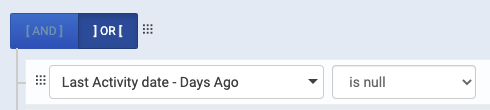
Condition Setting for "Is Null"
When looking for members who have not been engaged, don't forget to include "OR 'is null'" condition to include records with none of the activities logged.
Email Syncs
If you will be syncing over activity-based groups to MailChimp or Constant Contact, please note that MailChimp and Constant Contact do not send data back to member records in Novi, meaning groups based on any of the conditions above will not remove members from the group after an email is sent from your email marketing platform.
So what are your options?
One option is for an admin to add an activity (i.e. Note) to each of the member records that received the email campaign from MailChimp or Constant Contact. This way the member record will no longer be included in the Novi Group (until it meets the conditions again).
→ Learn More: 📄 Create or Edit a Custom Activity or Task
This wouldn't be a problem for a handful of records but is not ideal for a large list of members.
If you go this route, an admin will need to do this after every email campaign is sent to the group.
A second option is to set up a Drip Campaign in MailChimp or Constant Contact. This is the recommended approach if it will work for your situation & goals!
If you go this route, after the initial setup it will manage itself automatically, without an admin needing to manually add activity notes to the member records in Novi.
Learn more about how to set up an automated email series in MailChimp or Constant Contact:
Example Groups
Less Engaged Members - 90 days or longer since last engagement

Engaged Prospects - 90 days or less since last engagement
