Reviewing a Member's Full Term History with the Membership Ledger
Last updated: November 10, 2026
The Membership Ledger gives admins a complete view of a record’s membership history over time for both direct memberships and memberships inherited through the family tree.
Instead of showing only a record’s current membership values, the ledger preserves point-in-time details for each membership term held by the individual or company. This includes terms captured through Novi’s join and renewal processes, terms created during historical backfill, and historical terms added manually by association admins.
You can find the Membership Ledger on the Membership tab of a record.
Understanding Backfilled Membership Terms
We’ve created historical terms using the data available in your members’ activity timelines and audit logs. While these terms provide a starting point for your membership history, historical records may not include every change or event that occurred.
You can review your historical terms and edit the details as needed to ensure they accurately reflect your membership history.
Important Note: Backfilled Inherited From values are based on the known dues payer at the time - not necessarily the parent company in the family tree. Dues payer was not always logged historically, so this field may need manual correction on some terms.
Understanding the Membership Ledger List
Each term represented in the membership ledger displays details that help explain how that membership term was created, billed, provided benefits for the record, and more.
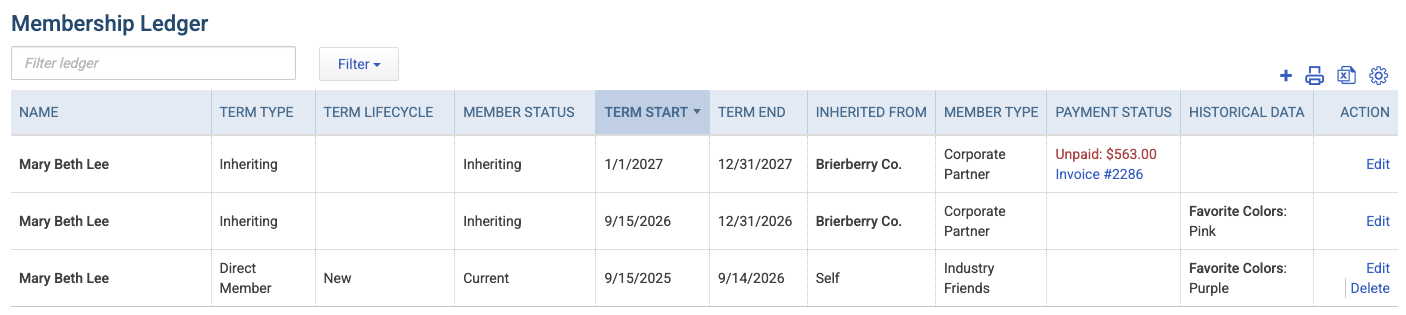
Term Type: Indicates whether the individual/company held the membership directly or inherited from a record in their family tree.
Term Lifecycle: Labels whether this was considered a "new" membership or a renewal for this term.
Inherited From: Links to the record for the Individual/Company the membership benefits were inherited from, OR says "self" for direct memberships.
Term Start: The first day of the term for direct memberships, and the first day inheriting benefits for inheriting membership terms.
Term End: The last day of the term for direct memberships, and the last day inheriting benefits for inheriting membership terms.
Member Type: The designated member type for direct memberships, or the effective member type for inheriting memberships during the listed term. If a member’s type changed mid-term and that change was captured during backfill, you may see two consecutive terms instead of one- one for each member type period.
Payment Status: Shows the linked dues invoice or sales receipt when Novi can associate a financial transaction with the term. Memberships started or renewed through Novi with a transaction typically show this automatically. Historical or backfilled terms, and memberships created at no charge, may not show a payment status until a transaction is linked (see Editing Membership Terms below).
Historical Data: Captures a point-in-time snapshot of selected field values when the membership term is created, such as during renewal. This helps admins see the values that applied to that specific term, even if the current value on the member’s record changes later.
Create Origin: Displays who created the membership term (the specific admin or Novi processes) and when the term was added to the ledger.
Filtering the Membership Ledger
By default, the Membership Ledger shows terms for the open record only (Member Only).
Use the ledger Filters to narrow results (for example by term type, member type, or membership status). You can also change Relationship Type to include terms for related records in the family tree - such as child contacts under a parent company. This works similarly to the Related Records filter on other tabs, like Accounting Transactions.
When you are done reviewing related records, switch Relationship Type back to Member Only so the ledger returns to showing only the current member’s terms.
How Membership Terms Are Created
Terms appear in the Membership Ledger in several ways:
Join and renewal in Novi: Terms are created automatically when membership is started or renewed through Novi’s processes.
Backfill: Historical terms were generated from available activity timeline and audit log data when the ledger was introduced (see Understanding Backfilled Membership Terms).
Manual historic terms: Admins can add terms from prior systems or exceptions that were never processed in Novi (see below).
Seat type changes on inheriting members: If an admin changes only the seat type for someone who is inheriting membership (without unassigning and reassigning the seat), the ledger reflects that change. A change on a later date creates a new term for the remainder of the period; a same-day change updates the existing term.
Mid-term member type changes (backfill): Where historical data showed a member type change in the middle of a term, backfill may split that period into two terms so each member type is visible. Going forward, live mid-term type changes are not automatically split the same way unless they follow another ledger-creating process.
Important Note: Merging records does not automatically move or rebuild membership ledger terms from a losing record onto the winning record. If history is missing after a merge, add a historic term manually on the remaining record.
Adding Historical Member Terms
The Membership Ledger automatically includes terms created through join and renewal processes handled directly in Novi. Terms from prior systems or membership exceptions managed outside of Novi may need to be added manually.
To add a historical term to a record:
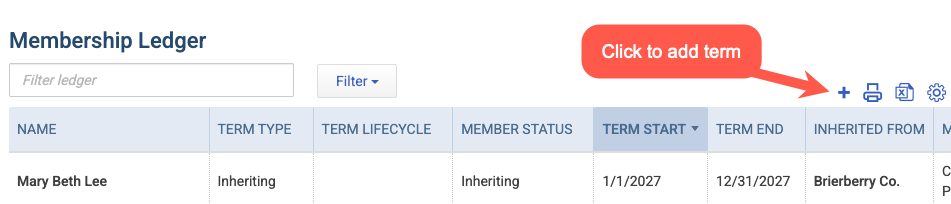
Go to the Membership tab of the record, then click the '+' icon above the ledger to add a new term
Fill in the dates of the membership term held in the Term Start and Term End boxes.
Important Note: If you are attempting to add new current membership to a record, this should not be handled via membership ledger. Instead, refer to 📄 Convert a Non-Member, Prospect, or Expired Member to a Current Member
Select whether the record was a Direct Member or Inheriting for that term
Optional: Add notes and/or any historical data you'd like to track from that particular term
Save & Close, or use the down arrow to Save & Add New term
Editing Membership Terms
Admins can open an existing term from the ledger to correct details - especially useful for reviewing backfilled or manually added historic terms.
Common edits include:
Term Start / Term End dates
Whether the term was Direct or Inheriting
Inherited From (which record provided benefits)
Notes and Historical Data values
The linked payment transaction (see below)
Linking or Unlinking a Payment Transaction
On historic and backfilled terms, Payment Status may be blank even when a dues invoice or sales receipt exists in Novi, such as when the transaction was created directly in QuickBooks Online, preventing it from being linked directly to the membership term. From the term edit window:
Open the term from the Membership Ledger
If no transaction is linked, use Link Transaction to select the related dues invoice or sales receipt
To remove an incorrect link, unlink the transaction and save
Important Note: If you change Inherited From on a term that already has a linked transaction, Novi will automatically unlink that transaction. Re-link the correct invoice or sales receipt after saving if needed.
Tracking Historical Data
Many associations collect information from members that is updated with each new term. On the member's record and in groups and reports, only the most recent value for the field is visible. Historical Data on the membership ledger allows admins to see previous values held by the company or individual when prior membership terms were created.
Important Note: The values captured for historical data are a point-in-time snapshot. This means the value will reflect what was in the field at the time of the term's creation, but not necessarily reflect any changes made between terms.
From the Member Type Settings
Start by going to Members > Member Settings > Member Types in the Novi admin sidebar, then click on the Member Type you plan to update. Once on the specific Member Type, select the Settings tab and scroll to the Historical Data section.
Custom fields that are used to calculate dues will be selected automatically for tracking and cannot be removed. Admins can add additional fields by choosing them from the drop-down menu and clicking the blue +Add button.
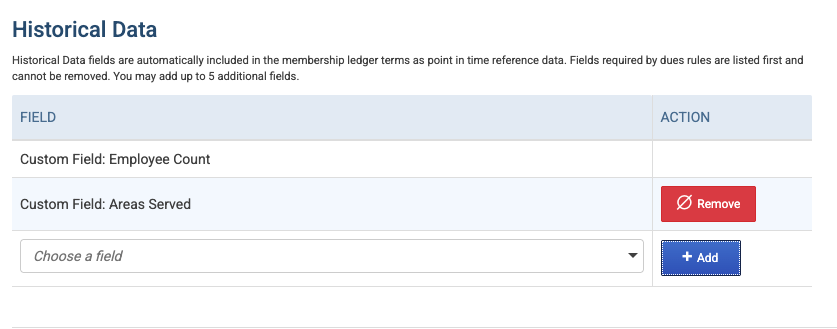
Member fields, like phone number or email address, can also be selected for historical data tracking.
From Historical Term Creation
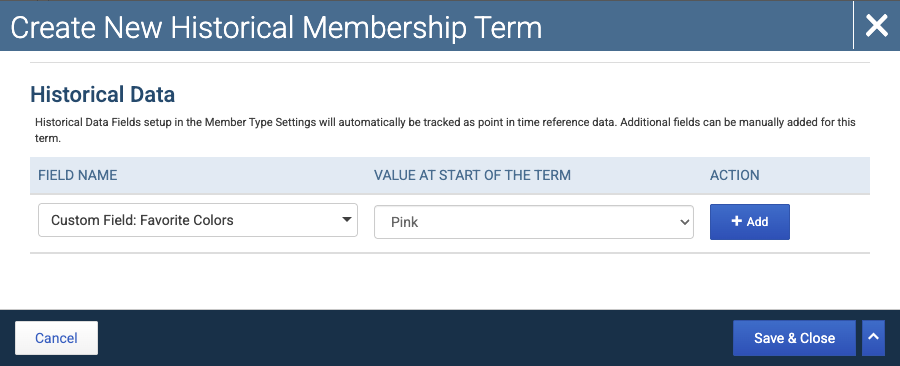
Admins can add historical values manually when creating a historical member term on the ledger. In the term creation window, select the field to add to the historical data. Then select the value at the start of the term and click the blue +Add button.
Membership Ledger and Reporting
At this time, the membership ledger does not impact built-in Novi reports like the Add, Drop, or Membership Change reports. Historical terms added via the membership ledger are not available to pull into custom reports. Instead, the ledger is meant to provide a helpful and in-depth view of a specific member's history and is only available on that member's record.