Limit How Many Event Tickets a Purchaser or Company Can Buy
Last updated: October 5, 2026
Purchase limits cap how many of a specific ticket one person, company, or family tree can buy. Use them for complimentary sponsor tickets, discounted member-benefit tickets, or popular events where one purchaser shouldn't claim more than their share.
When to Use a Purchase Limit
Purchase limits work best for rules like these:
Each person may register for 1 ticket.
Each company may purchase up to 4 discounted tickets.
A sponsor's entire family tree may register for up to 10 tickets.
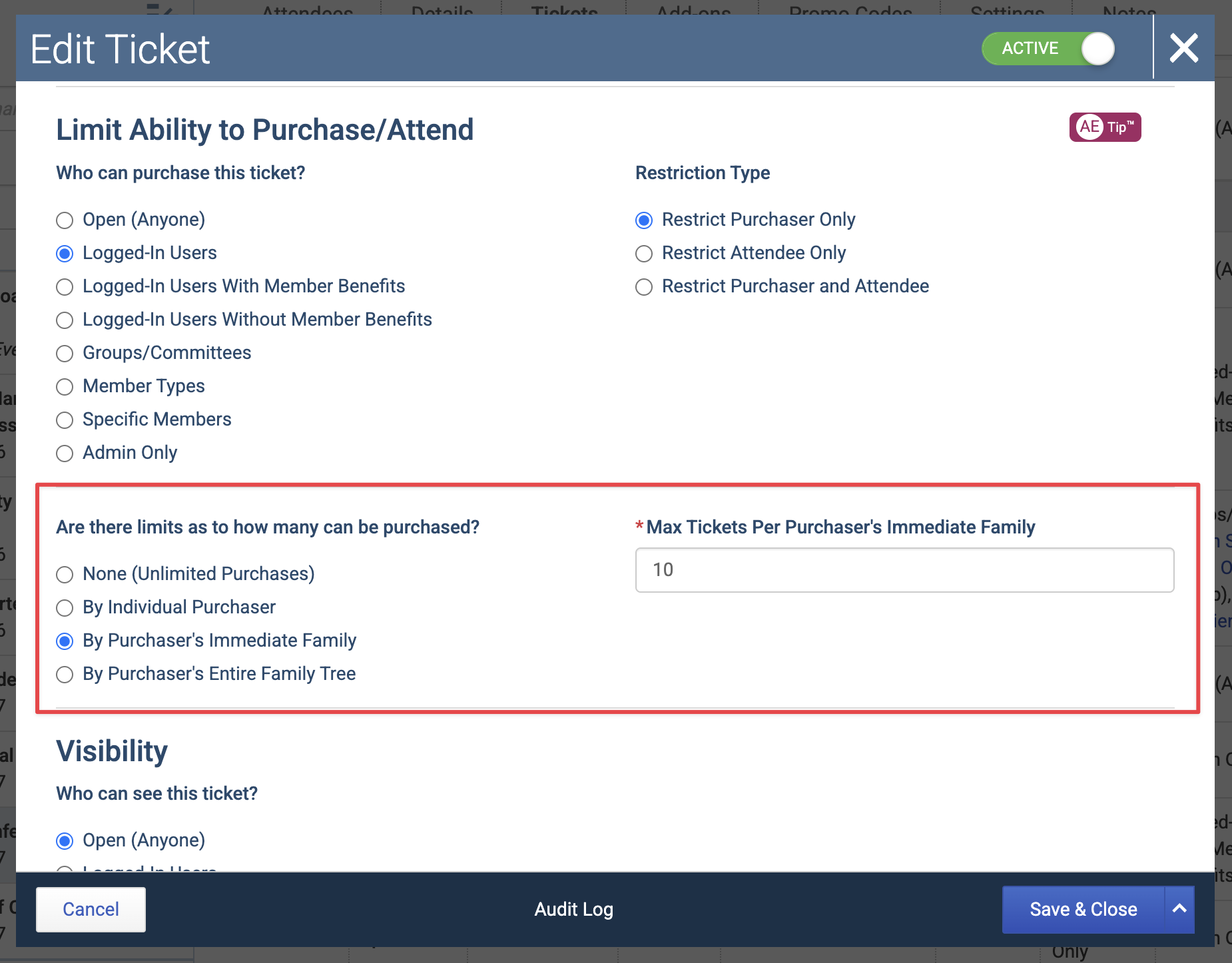
This setting is different from Limited Quantity. Limited Quantity controls the total number of tickets available for that ticket type. Purchase limits control how many of that ticket can be purchased by a specific purchaser or purchaser family.
Before You Begin
Novi has to know who the purchaser is in order to count or restrict their purchases. That means the ticket can't be set to Open (Anyone), because anyone could check out without logging in and Novi would have no record to count against.
Purchase-restricted tickets can't be purchased by non-logged in users.
Set a Purchase Limit
Open an event in the admin and go to the Tickets tab.
Create a new ticket, or edit an existing one.
Under Limit Ability to Purchase/Attend > Who can purchase this ticket?, select any option other than Open (Anyone).
Examples include Logged-In Users With Member Benefits, Specific Group, Member Type, or Specific Member(s).
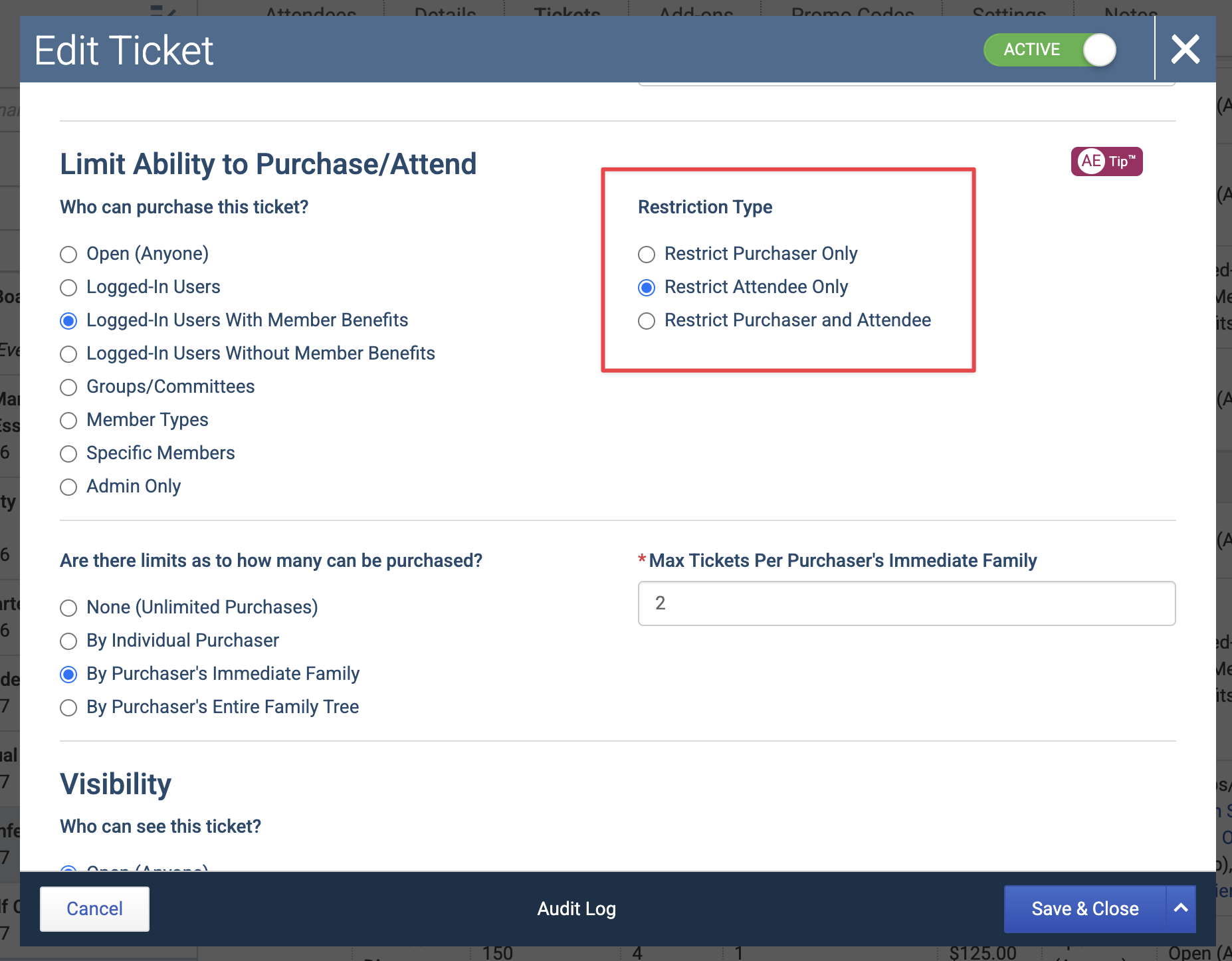
Select a Restriction Type. This tells Novi whether the purchaser, the attendee, or both must qualify. (See How Purchase Limits Work with Purchaser and Attendee Restrictions below for more details.)
Under Are there limits as to how many can be purchased?, choose how Novi should count the limit.
Enter the maximum number of tickets in the Max Tickets field.
Save the ticket.
Purchase Limit Options
There are three ways to count a ticket purchase limit:
1. By Individual Purchaser
Each logged-in purchaser gets their own limit.
Example: Each person may register for 1 ticket. With a limit of 1 by individual purchaser, each person can buy or claim only 1 of that ticket.
2. By Purchaser’s Immediate Family
The purchaser and their immediate family share one combined limit. This is most often used when a company and its direct staff should share a set number of tickets.
Example: Each company may purchase up to 4 discounted tickets. If one staff member registers their team for all four tickets, no one else in that immediate family can buy more of that ticket.
3. By Purchaser’s Entire Family Tree
The limit is shared across the purchaser's full family tree, including related grandparent, parent, and sub-companies.
Example: A major sponsor can register for up to 10 tickets for representatives from the parent company, sub-companies, or other related records. The whole family tree shares those 10 tickets.
How Purchase Limits Work with Purchaser and Attendee Restrictions
Novi answers two separate questions when someone selects a restricted ticket:
Who must qualify for the ticket? This is controlled by the ticket’s Restriction Type.
Whose purchases count toward the limit? This is controlled by the purchase limit option.
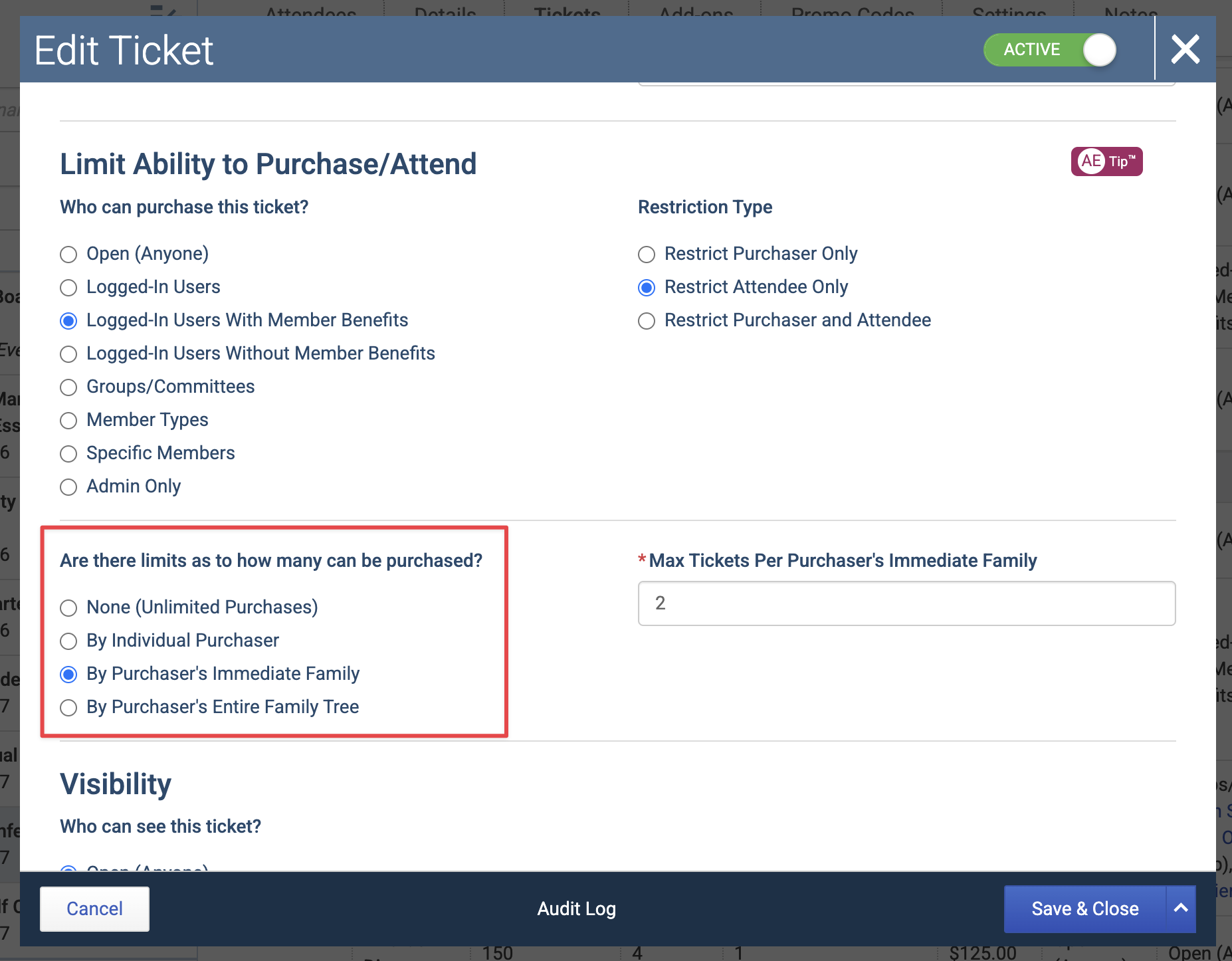
These can be different people, which matters most when one person registers on behalf of someone else.
Restriction Type Options
Restrict Purchaser Only: The logged-in purchaser must qualify.
Restrict Attendee Only: The selected attendee must qualify.
Restrict Purchaser and Attendee: Both must qualify.
Example: A Non-Member Staff Person Registers Member Colleagues
A company's family tree includes both members and non-members. A non-member staff person wants to register two member colleagues. The ticket is set up like this:
Who can purchase this ticket? Logged-In Users With Member Benefits
Restriction Type: Restrict Attendee Only
Purchase limit: By Purchaser's Immediate Family
Max Tickets: 2
Because the restriction is attendee-only, Novi checks whether the attendees have member benefits. It does not check the purchaser's member status. The non-member staff person can select two eligible member colleagues from their family tree, as long as their immediate family hasn't already used its 2 tickets.
The limit is still counted against the purchaser's immediate family, not the attendees.
Key Takeaway: The Restriction Type decides who must be eligible. The purchase limit decides whose purchases count toward the maximum. These may be different people.
Learn More: 📄 Event Ticket Setup > Ability to Purchase/Attend
What Happens During Registration
Novi checks the purchaser's previous purchases of that ticket against the limit.
If the selected quantity would go over the limit, the purchaser can't complete that selection.
The limit applies only to the ticket where it's set. It does not limit purchases across other ticket types in the event.
Earlier purchases still count if the purchaser comes back later. This only works if they're logged in and the original purchase is tied to their record.
Choosing the Right Setup
Goal | Recommended setup |
|---|---|
Only 100 total tickets can be sold | Use Limited Quantity. |
Each individual can only register for 1 ticket | Use a purchase limit By Individual Purchaser. |
Each company can only register for 2 tickets | Use a purchase limit By Purchaser’s Immediate Family. |
A sponsor’s parent, child, and related companies can register for up to 10 tickets | Use a purchase limit By Purchaser’s Entire Family Tree. |
Members get 1 discounted ticket, then additional tickets should be full price | Create a restricted discounted ticket with a purchase limit, then create a separate standard-price ticket for additional attendees. |
Important Notes
Limits apply to website registrations only. Admins can still register attendees from the backend, even if the limit would block the purchase on the website.
Cancelling a registration frees up its tickets. Cancelled tickets no longer count toward the purchase limit.
Limits count tickets, not seats. A foursome ticket with Seats per Ticket set to 4 counts as 1 ticket toward the limit.
Visibility and purchasability are separate settings. A ticket can be visible to one audience and purchasable by another. Review both before publishing the event.