Novi Support and Help Resources
Last updated: September 7, 2026
Learn how to contact Novi Support, receive updates on your conversations, and find the best support resources for your question.
Start with the Novi Help Center
When you’re looking for how-to information, best practices, or answers to common questions, we recommend starting with the Novi Help Center.
Our help articles are designed to give you and your team 24/7 access to step-by-step guidance, screenshots, best practices, and training resources. If an article is unclear or missing something, please let us know. Many Novi help articles began as customer questions, and your feedback helps us keep the Help Center useful and up to date.
Contacting Novi Support
If you can’t find the answer you need in the Help Center, the best way to contact Novi Support is through the in-app chat widget ("the blue bubble") powered by Pylon. You can also reach the team by emailing help@noviams.com.
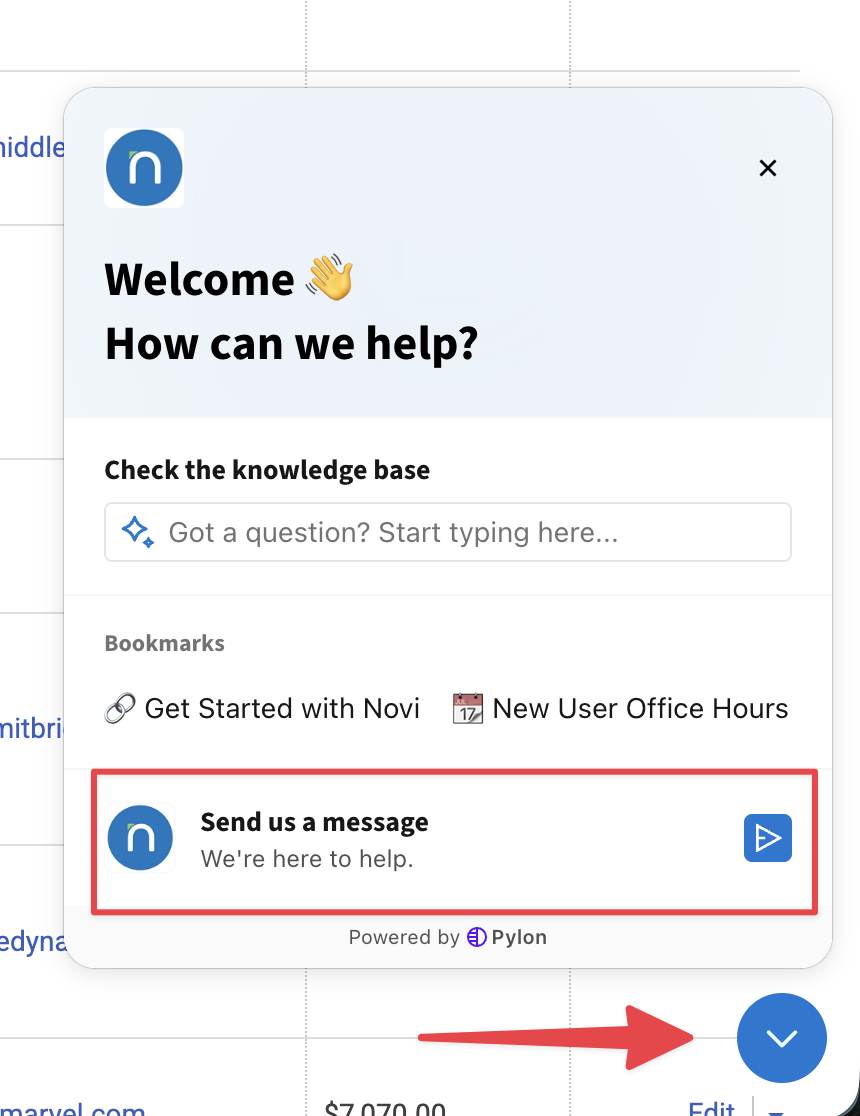
Requests submitted through the in-app messenger or by email are routed to our Customer Support team so we can review, collaborate internally, and keep you updated.
Using the support messenger helps our team respond efficiently, loop in the right specialists when needed, and keep the full conversation history in one place. This is generally faster and more collaborative than calling or emailing an individual Novi team member directly.
How to Open the Support Messenger
When you are logged in as an admin, you can open the support messenger from the chat icon in the bottom-right corner of your Novi admin site or from the Novi Help Center.
From there, you can search help articles, start a new conversation with the Novi team, or continue an existing support conversation.
Submitting a Support Request
When you start a support conversation, include as much context as possible so our team can begin investigating quickly. Helpful details include:
The page, record, event, transaction, report, or workflow you are working on
What you expected to happen
What actually happened
Steps you already tried
Screenshots, examples, links, or error messages, when available
Whether the issue is blocking your team or affecting members
If your question is about a specific record or transaction, please include a direct link to it in Novi whenever possible.
Receiving Support Updates
After you submit a question, replies from the Novi team will appear in the support messenger. Depending on your notification settings and how the conversation was started, you may also receive email notifications when our team responds.
You can reply from the support messenger to keep the conversation organized in one place. If you receive an email notification, replying by email may also add your response back to the support conversation.
For ongoing items such as bug reports, feature requests, or questions that require input from another Novi specialist, the support conversation is where we’ll share updates and next steps.
Support Hours and Response Time
The Novi team is online Monday through Friday from 9:00 AM–6:00 PM ET.
Our goal is to respond to every request within one business day. In many cases, you may hear back much sooner, depending on current support volume and the complexity of your question.
Novi Office Hours
Novi Office Hours are dedicated weekly drop-in sessions where you can ask questions, get real-time support, and collaborate directly with the Novi team. You’re welcome to stop by during the scheduled hour and leave when you’re ready.
Registration is required. Learn more and register for Office Hours.
Zoom Meetings for Complex Questions
For especially complex topics, the Novi team may suggest a video meeting so we can better understand your goals, walk through the issue together, or review next steps.
Training and Consulting
Novi offers regularly scheduled group training sessions covering core topics such as Member Records, Website Content, Events, Groups & Committees, Transactions, Ecommerce, and Reports. Recordings are available on demand through Novi HQ for logged-in users.
If you need more specific training, you can book a tailored one-hour session with a Novi Customer Experience Specialist. These sessions may include customized guidance, a recording, and follow-up notes. Learn more about one-on-one training options.
Novi Notes and Organization-Specific Resources
During onboarding, your onboarding specialist may have documented organization-specific processes in your association’s Novi Notes. Novi Notes are a dedicated backend resource for documenting processes that are unique to your organization.
For process-related questions, check your Novi Notes and keep them updated as your team’s workflows change.
Support for Members
Novi Support works directly with association staff and admins, not with individual members. While we’re happy to help your team support members’ use of your website, your association knows your membership, policies, benefits, and access rules best.
This helps ensure members receive guidance that matches your organization’s processes and protects access to member-only information or benefits.