Dynamic Ticket Pricing for Events
Last updated: September 3, 2026
Learn how set-up dynamic ticket pricing for events.
Dynamic Ticket Pricing allows admins to offer flexible pricing for event registrations without having to create multiple tickets. This is ideal for early-bird discounts, last-minute price increases, or incentives for purchasing multiple tickets at once.
There are two dynamic pricing options available. These options must be enabled before using the ticket. Only one dynamic pricing method can be applied per ticket.
Dynamic Pricing by Date
Dynamic Pricing by Date allows you to automatically adjust a ticket’s price based on a specified date range and times. This option works especially well for:
Early bird discount pricing
Gradual price increases as the event approaches
Time-based promotional pricing
Setup: Dynamic Pricing by Date
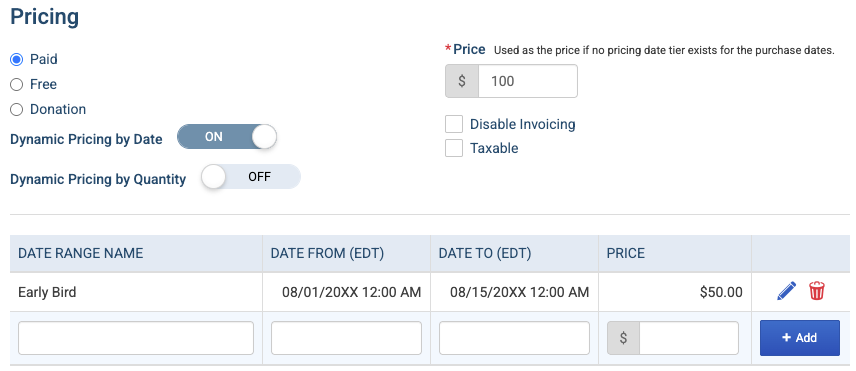
Toggle ON Dynamic Pricing by Date
Set a Date Range with a corresponding price
Make sure to press "+ Add" to save your work
📌 Important Notes
Date ranges without a Date To will continue through the end of the overall event registration.
Any tickets purchased outside of a specified date range, but still available for registration, will default to the amount in the standard Price field pictured above
The ticket time defaults to the timezone of the event. If the event is all day, the ticket time will be in the association's timezone.
Frontend Experience: Dynamic Pricing by Date
From the registrant’s perspective:
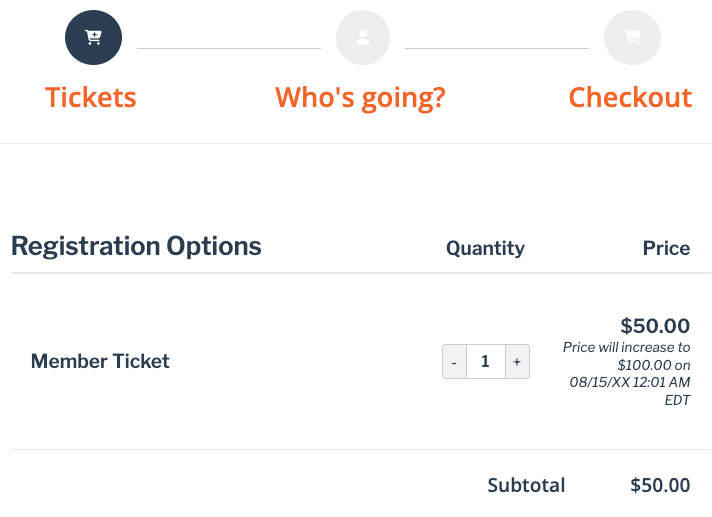
The ticket price displayed reflects the current date at the time of registration.
Prices automatically adjust as the registration date moves into a new pricing range.
Dynamic Pricing by Quantity
Dynamic Pricing by Quantity allows you to set ticket prices based on how many tickets are purchased in a single registration/cart. This is ideal for:
Group discounts
Bulk purchase incentives
Tiered pricing
Setup: Dynamic Pricing by Quantity
Toggle ON Dynamic Pricing by Quantity
Set Min Qty and Max Qty to determine the range. Leave Max Qty empty if you want a limitless range.
Set a Price Per Ticket for each range
Make sure to press "+ Add" to save your work
📌 Important Note: Quantity ranges set a price per ticket.

In the example above, purchasing 2 tickets would cost $100. Purchasing 3 tickets would cost $75 and not $125.
If a person selects a number of tickets and the value does not fall into a defined range, then the default amount set in the Price field pictured above will apply.
Pricing by quantity does not count across multiple registrations. Tickets must be in the same cart for quantity pricing to apply.
💡 Tip: Tiered pricing is an excellent option when you want to offer quantity discounts for event registrations like: "Buy 6 or more to receive a discount."
Frontend Experience: Quantity-Based Pricing
From the registrant’s perspective:
If a registrant selects a quantity of tickets that places them within a different tier, the price will adjust automatically. In the image below, the price will automatically decrease to $25 per ticket once at least three are selected.
Discounts apply only when tickets are purchased together in the same cart.
Quantity pricing does not combine across multiple registrations.
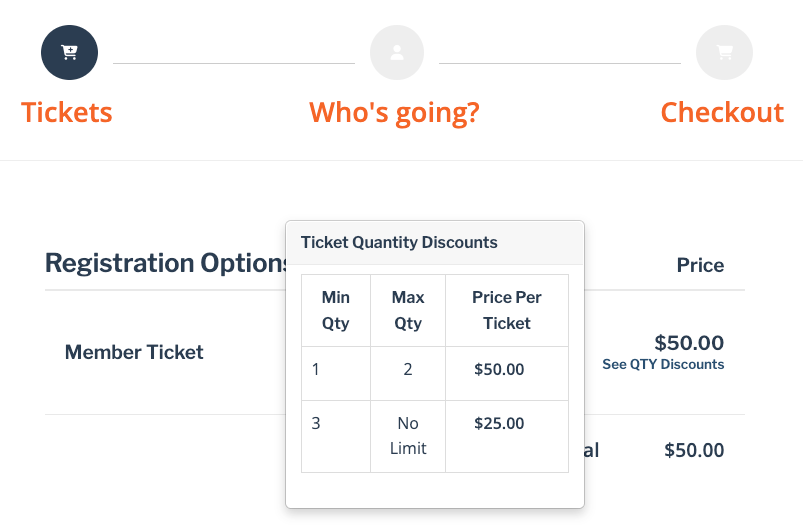
📌 Important Note: When using Dynamic Pricing by Quantity, we recommend selecting Ticket-Based Registration rather than Attendee-Based Registration. Ticket-based registration allows members to see that there is a quantity discount applied to the ticket before adding attendees, providing clearer pricing visibility at checkout during registration.