Novi Notes
Last updated: November 13, 2026
Novi Notes is a dedicated page on the backend of your site where your team can document processes that are specific to your organization.
To access Novi Notes, click the question mark in the upper-right corner of your site’s backend, then select Novi Notes.

Looking for other ways to get help? See 📄 Novi Support and Help Resources.
What are Novi Notes?
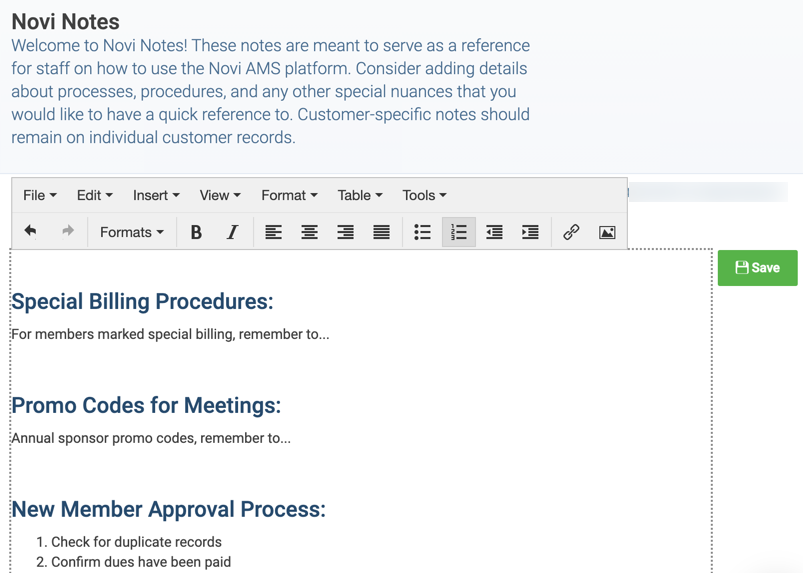
Novi Notes is a dedicated page on the backend of your site for documenting processes that are specific to your organization. The content area on this page is fully editable for easy reading, and admins have the ability to add text, images, links, and other content as needed.
For example, you may add a note about:
special billing procedures
nuanced event setup
steps to take when approving new members
when and how to drop members who haven't paid their dues
or other helpful tips for your teammates when working in Novi
This isn’t intended to hold notes about specific members (remember: you have the Timeline for that!), but rather, notes that will help you and your team streamline and remember your important Novi processes. Your Novi Notes will also come in handy when hiring new staff or if someone goes on vacation, to quickly get them up to speed on the nuances of your association.

Add your notes in the editable content region, using the editor toolbar to format and insert links, images, and files as needed. Don't forget to click the green Save button on the right! Changes will be tracked in the audit log.
Who Can Access Novi Notes?
A person's level of admin access determines if they can edit Novi Notes or only view the information.
Association Admins and Novi Admins have full editing privileges.
Limited Admins can view the content, but will not have the option to edit.
This page is only accessible on the backend and is not visible to your regular users/members.