Member Engagement Report
Last updated: September 3, 2026
Learn how Novi AMS tracks whether members have been engaged through their attendance at an event (or class), using your Ecommerce store, or participating with a Committee.
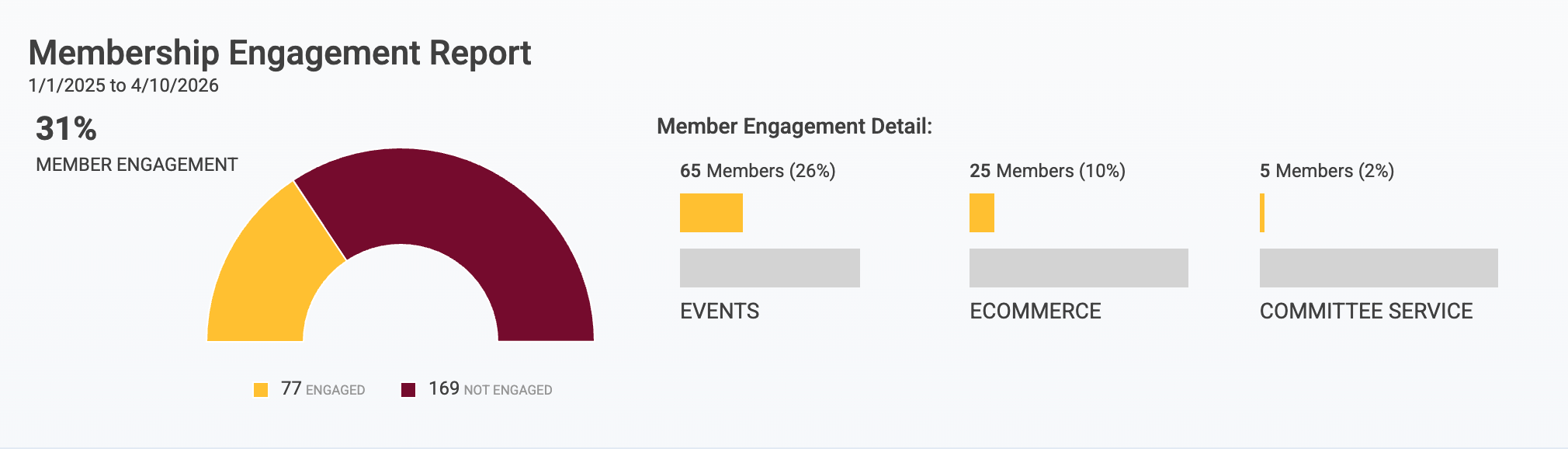
The Membership Engagement Report gives you the opportunity to run a report showing member involvement and activity relating to events, ecommerce, and committees so that you can make smarter business decisions when it comes to your members.
Note: The Member Engagement Report is different than Member Health. This report is designed to quickly and simply tell you which of your members have taken at least one engagement action in a given time period.
To view this report, navigate to
Reporting > Membership > Member Engagement
The Report
At its core, the report quickly lets you filter different segments of your members to determine whether they have engaged, defined as registering for an event, purchasing something from your Ecommerce store, or serving a committee term within a specified time period. If the member has just one of those items during the time period, the member is considered "engaged."
For trade and hybrid associations where a company is the member, the report looks one level down the family tree to the company's staff. If just one person on that company's staff has registered for an event, made an Ecommerce purchase, or held a committee term then the company is considered "engaged."
💡 Pro Tip: While the Membership Engagement Report can give you a picture of how members are engaging with your site, it may not capture the whole story of communication from your association. Some members may not have attended events or purchased products, but still had meaningful interactions with association admins that were tracked on their Activity Timeline.
By creating a Group in Novi based on the last activity date, admins can build a customized segment of engaged or disengaged members.
Components of the Report
The member engagement report will show you all of the following:
Percentage of members engaged in events, e-commerce, or committees
Percentage of members not engaged in events, e-commerce, or committees
A list of all engaged members
A list of all members not engaged
Member information: Name, member type, billing address, shipping address, open balance
Gear options: Parent name, the member's phone and email, primary contact name, primary contact phone and email, and the option to add custom fields
The last event the member was registered for
The last order purchased by the member
The last committee term served by the member
Display Columns
Some columns show by default, while others are available under the gear icon. To sort the report by a particular column, click on a specific column header.
You can see a full list of the available columns here.

Export the Report
The report can be exported to a .pdf or .csv file by clicking the corresponding icon at the top right of the list.
PDF (printer icon) - includes only the columns that are shown in the list
CSV (paper with an "x" icon) - includes the data from all available columns

Additional Info
The report will pull from the beginning of the year through the current date to ensure that accurate data is expressed in your percentages. This date range is just the default range.
E-commerce engagement relating to members includes the customer and sub-customers (one level down).
Events engagement relating to members includes the customer and sub-customers (one level down).
Committee engagement relating to members includes the customer and sub-customers (one level down).
Percentages are based on the number of dues-paying members and their sub-customers meeting the Events, E-commerce, or Committee criteria, over the number of dues-paying members.
Deleted/deactivated records are not factored into this report.