Cookies, PostHog, and Novi AMS: Privacy Options for Your Association
Last updated: September 3, 2026
Learn more about choices you can make about how your member information is handled in Novi AMS
Cookies
What are Cookies?
Cookies are small files widely used across the Internet and stored in a visitor's internet browser used to recognize devices, track browsing activity, and remember user information. Essential cookies are necessary to navigate secure, authenticated pages and enforce password protected access.
Because cookies can raise consumer privacy concerns, their use can trigger legal challenges especially in states like California or New York, and internationally as well particularly in the European Union (EU) or the United Kingdom (UK).
How Does Novi AMS Use Cookies?
In Novi AMS we use cookies to enhance core functionality in the following ways:
Keeping users logged in
Maintaining ecommerce shopping carts and session data
Enabling tracking analytics (such as Google Analytics) and troubleshooting tools (such as PostHog)
Enabling the use of our optional "one-time alert" banner which shows a simple notice to your website visitors.
Important Note: The one-time banner often has a link to your Terms and Conditions/Privacy Policy page. However it is an intentionally "lightweight" option and not a full legal compliance tool. For example, the banner does not:
Block cookies or scripts from running before the user clicks "Acknowledge"
Record whether a user clicked "Acknowledge" or not
Third-Party Cookies
There are two different kinds of third-party cookies that we routinely see being deployed by Novi AMS users. The first are cookies used by marketing firms to track promotional ad campaigns and the second are cookie management systems designed to help users stay in compliance with data privacy laws such as the California Consumer Privacy Act (CCPA) or the General Data Protection Regulation in the EU (GDPR).
Marketing Cookies
Often used by marketing and public relations firms, these cookies are designed to build user profiles, deliver personalized advertisements, and measure campaign effectiveness. There are larger providers who use these kinds of cookies such as Google Ads, and smaller custom cookies built for individual marketing firms.
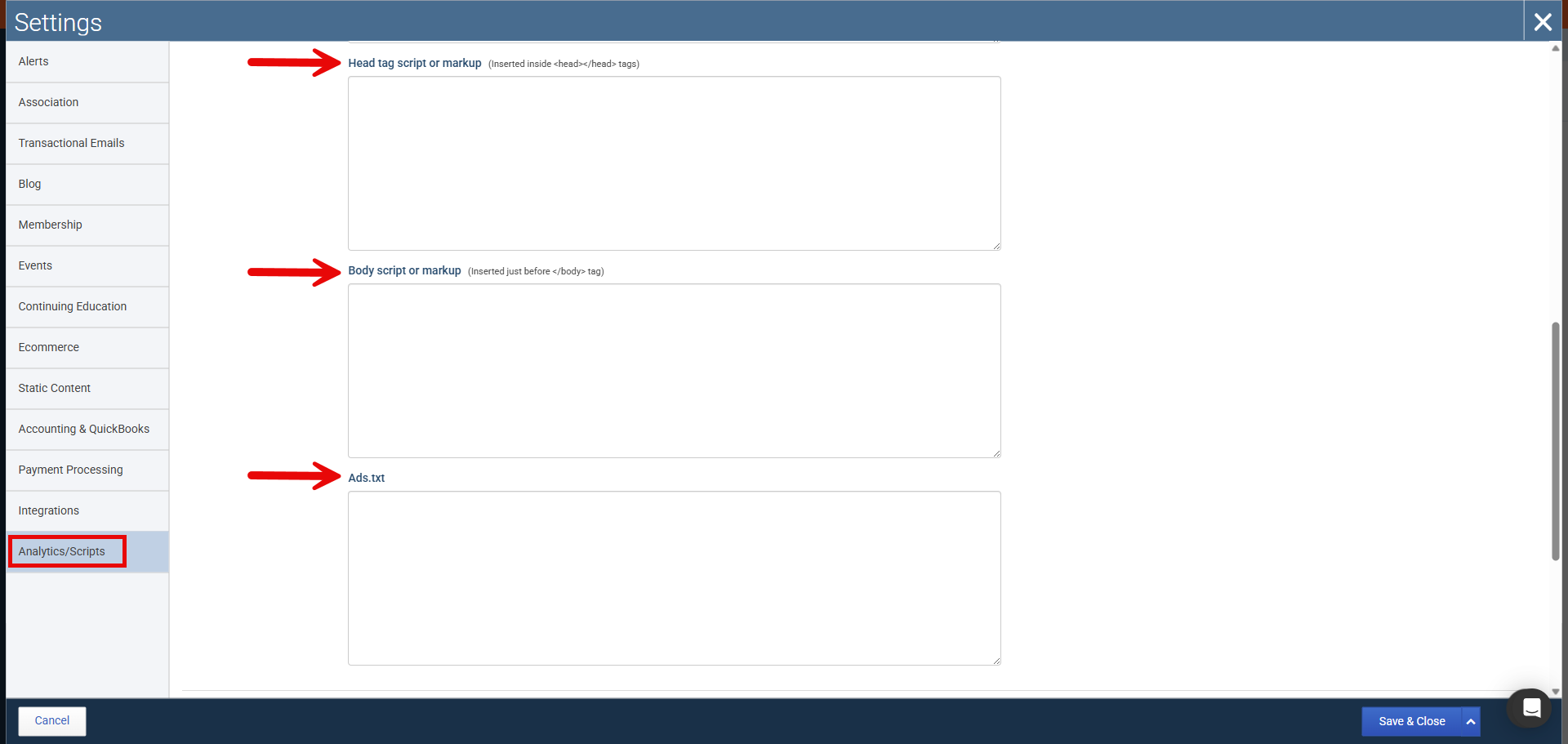
We often see them in Association Settings > Analytics/Scripts in the , or ads.txt areas.
Cookie Management Systems
If you want to use an enhanced approach to cookie management on your Novi AMS site using a service such as CookieYes or similar tools, you can easily do that within Novi. These types of third party tools do things such as:
Help you maintain legal compliance
Increase transparency around essential cookies that are necessary for site functionality
Record user consent for the use of essential cookies and give them the opportunity to accept, reject, or customize other cookies which may be optional
Block scripts such as analytics or click tracking from running until express consent is given
Novi AMS has created a special field for you to use to add cookie management system script so it will run prior to any others, however we will not configure or manage the third-party service on your behalf.
📌 Important Note: Use caution when blocking all scripts from a single specified domain, as this can also block scripts that are essential for website functionality and core application features. Before implementing domain-level blocking, carefully audit the scripts associated with that domain to ensure you’re not unintentionally disrupting critical functionality. For example, instead of blocking google.com, you might block only the specific Google script or service that is responsible for the cookies or tracking you want to prevent.
We also cannot recommend a particular cookie management system, although we encourage you to do your own research, consult with your IT departments, or ask other users what they may have had success with in Novi Exchange.
You can find this area in Association Settings > Analytics/Scripts in the Scripts section.

Cookies and PostHog
Novi uses PostHog for analytics and troubleshooting to help improve reliability, diagnose issues, and understand aggregate usage. PostHog does use cookies to create recordings that allow us to watch session replays when you or your members interact with your Novi AMS platforms and websites. It is a key component of our ability to debug and render assistance when issues are reported.
PostHog can be turned off for frontend (public) users at any time in Association Settings > Analytics/Scripts if you prefer not to enable analytics and diagnostics beyond strictly necessary operations or if your association's attorney recommends doing so. It cannot be turned off for Novi Admin users because we rely on it to properly support our product.
Disabling PostHog will not prevent the use of essential first-party cookies required to run the site nor will it prevent you from adding additional cookies and pixels to your site at anytime.
However, turning it off will deprive Novi Support of visual context for user reported bugs. If you do turn it off, you (not Novi) must turn it back on. Novi personnel cannot re-enable it on your behalf.

Pros and Cons of Strict Cookie Management
Pros
Stronger legal posture in high‑risk jurisdictions (e.g., GDPR, California privacy litigation)
Clearer transparency with members about tracking and analytics
Aligns with “privacy‑first” brand positioning for tech‑forward associations
Cons
Many visitors click "Deny" which means:
Analytics data (e.g., Google Analytics) can become incomplete or misleading
PostHog recordings may not be available, reducing our ability to debug issues
User‑experience impacts:
Users may need to log in more often (no cookie to remember them)
Carts and preferences may not persist as expected
Additional cost and setup:
Third‑party service fees (often based on pageviews)
Internal staff time to configure and maintain settings
Novi's Position
Here are some brief declarative statements to clarify our position in regards to both cookie management systems and the use of PostHog.
Novi Does:
Offer transparency about tools like cookies and PostHog
Provide controls for you to disable PostHog for front‑end users
Provide places for you to add your own cookie manager scripts
Support you in using these tools once you and your attorney decide what is in the best interest of your organization
Novi Does Not:
Provide legal advice or recommendations
Define a single “best practice” that fits every association
Automatically roll out a strict cookie manager for all customers
Novi Can:
Point you to this article and related documentation
Show you where you can:
Update your legal/privacy content in Novi
Add analytics and cookie manager scripts
Enable/Disable PostHog for front‑end users
Novi Cannot:
Draft your privacy policy for you
Tell you what your association “must” do to comply with specific laws
How to Decide What's Right for Your Organization
Although we cannot give you precise instructions, here are some things you can keep in mind as you explore these issues with your legal counsel, your board, and your staff.
Consult your attorney for guidance on:
Website cookie usage in the jurisdictions in which you operate (e.g., specific states in the US such as California or internationally in the EU or elsewhere)
The tools you use (Google Analytics, PostHog, other scripts)
Your brand stance on privacy (e.g., tech‑leader vs. minimal compliance)
Discuss trade‑offs internally:
Legal risk vs. user experience
Data completeness vs. member privacy expectations
Choose your path based on your legal counsel's input:
Implement a third‑party cookie manager for stricter control if so desired
Disable PostHog for front‑end visitors if advised by counsel
Enable or disable Novi’s lightweight one‑time alert