Event Registration Abandonment Email
Last updated: September 3, 2026
Learn what the event registration abandonment email is, who receives it, when it's sent, and how you can edit these settings.
Remind your members about the event they were looking at with the event registration abandonment email. Similar to the Ecommerce Cart Abandonment Email, members can now receive an automated email reminding them to complete an event registration if they begin one but don't finish it.
How It Works
The email sends to logged-in users who click Register Now for an event but don't complete checkout. Registration is considered complete once the member reaches the success page after checkout.
If a user begins registration as a guest but logs in during the process, they will still receive the reminder email.
If the event is sold out with no available tickets remaining - either across the entire event or across all active, individually ticketed options - the email will not send, even if it sells out during the abandonment timeframe. For example, if tickets for a main event are sold out but tickets for an after-party are still available, the abandonment email will still be triggered. This ensures that potential attendees are informed about remaining opportunities to participate.
Similarly, if registration is closed - either at the overall event level or because all active, individual tickets have passed their end date - the email will not send."
The timer starts from the user's last activity during the registration flow, beginning with clicking on the Register Now button. If they return to the event and re-engage with the registration process without completing checkout, the timer resets.
📌 Important Note: The abandonment email is tied to the event registration process itself, not the page a user arrives from. The timer will trigger even if your event uses a custom landing page or static page via the Details Override Link.
Configuring the Registration Abandonment Email
To configure the settings for this registration abandonment email, navigate to Association Settings > Events > Event Registration Abandonment Email.
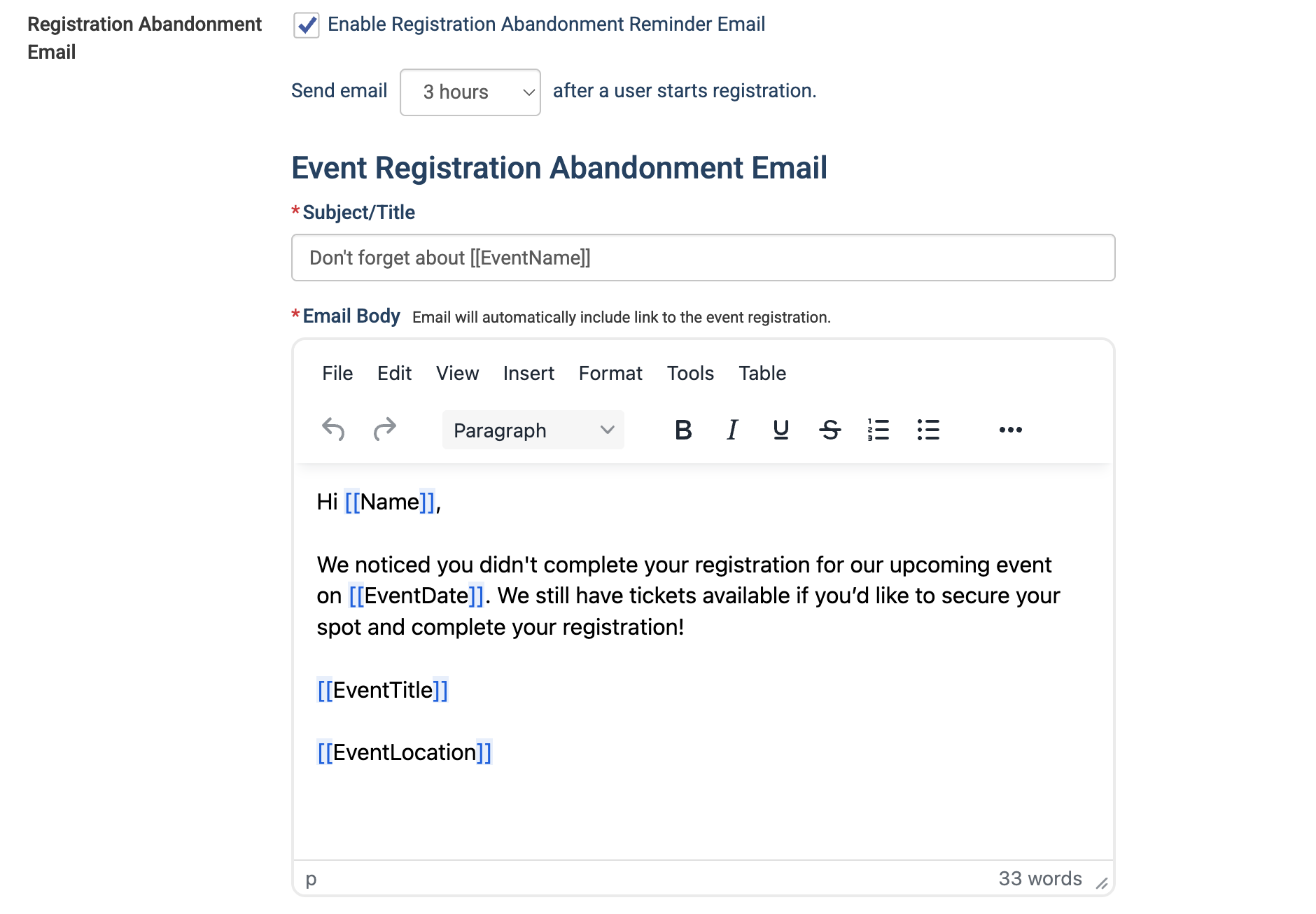
Check or uncheck Enable Registration Abandonment Reminder Email to turn the email on or off.
Use the timing dropdown to set how long after a user starts registration the email should send. Options are 3 hours (default), 6 hours, 10 hours, or 24 hours.
Edit the Subject/Title field to customize the email subject line. The default subject is "Don't forget about [[EventName]]"
Edit the Email Body to customize the message your members receive. A default message is pre-populated as a starting point. The email will automatically include a link back to the event registration.
The following merge fields are available for the subject line and email body:
[[Name]]
[[EventDate]]
[[EventTitle]]
[[EventLocation]]
💡 Tip: The default email body is a great starting point – associations can personalize the tone and messaging to match their voice and encourage members to complete their registration.
📌 Important Notes
This is a global setting and applies to all events on your site. It cannot be configured per event.
Once the timeframe passes, the email is sent within a few minutes.
The email automatically includes a link back to the event registration.
Abandonment emails are not sent when testing event registration by impersonating a member, ensuring testing do not trigger unnecessary notifications.