What's New At Novi: September 2025
Last updated: September 3, 2026
Novi AMS regularly releases new enhancements - check out what's new!
Jump ahead to any section using the navigation on the right →
📣 Novi Happenings 📣
🎉 Novi Summit 2026 Registration is open!

Details at a Glance:
Early Bird Pricing (ends 10/31!): $649
Hotel Rate: $284 (link available in your registration confirmation email)
Pre-Conference Workshops will start the afternoon of Feb. 23, and the opening reception will be later that evening.
NEW! In addition to Novi Newbies and Novi 2.0, we're offering a third pre-conference workshop on "Automation and Productivity." Think Zapier, AI, & tips and tricks for working smarter.
💬 Upcoming Roundtables
Please join us for our upcoming Novi Roundtables to connect and learn with fellow Novi users on the following topics:
Zapier Show & Tell // Thursday, October 23
Join our Zapier roundtable for a ‘show and tell’ of time-saving automations and practical tips from fellow Novi customers.
Constant Contact Automation, Tips & Tricks // Wednesday, October 29
New to Constant Contact or a seasoned pro? Join our roundtable to uncover smart strategies, fan-favorite features, and automation best practices.
🚗 Join us for one of our last Novi Road Shows!
Richmond, VA area, please join us for our Novi Road Show on September 26 and Chicago area, join us October 9! These in-person trainings are designed for both new users and those needing a refresher.
Each half-day session covers the basics - membership, events, groups, directories, reporting, and more. While geared toward beginners, all are welcome! Just bring your laptop and questions - we’ll provide the rest.
💼 Novi Office Hours – Drop In Support
We’re excited to offer dedicated weekly Office Hours, providing you with the opportunity to ask questions, get real-time support, and collaborate directly with the Novi team. Stop by anytime during the scheduled hour, and feel free to leave when you’re ready. Please note, pre-registration is required. We look forward to seeing you there!
🎓 Group Trainings
Novi provides free online group training sessions every month, covering a range of Novi-specific topics. We've recently added "Welcome to Novi" trainings for new team members, and special trainings for Constant Contact/MailChimp users on 9/17!
If you can’t attend a live session, don’t worry - we've got you covered with recordings to review at your convenience!
🌟 In the Spotlight 🌟
🔍 Upcoming Renewals Report
Ready for a clearer estimate of dues income without juggling spreadsheets? The new Upcoming Renewals Report lets you easily see dues renewal amounts per member, set retention rate assumptions, view projections by member type, and export results for deeper analysis. Reports update automatically each night, giving you a built-in, dynamic way to forecast upcoming dues – all directly within Novi! 🎉
→ Learn More: Upcoming Renewals Report
💰 Allow Users to Make Partial Payments on Invoices
Give your members more flexibility at checkout! With Partial Payments enabled, members can now pay invoices in smaller amounts directly through their Member Compass.
Instead of paying the full balance all at once, members can enter a custom payment amount and even use different payment methods across installments.
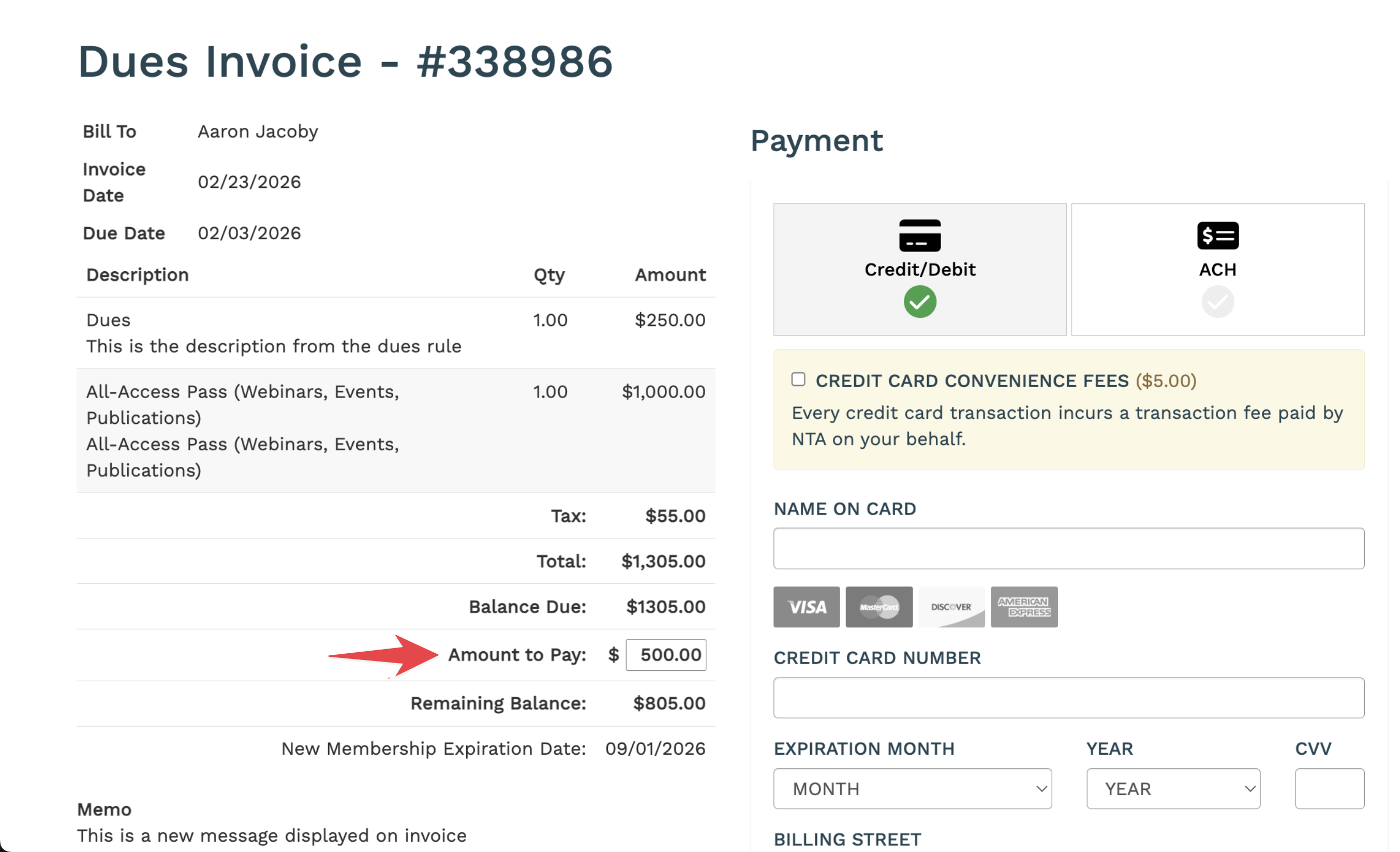
→ Learn More: Allow Members to Make Partial Payments
✅ Census Improvements: Faster Setup & Clearer Tracking
We’ve made two big upgrades to streamline your Census workflows:
1. Copy a Census
No more starting from scratch each time. You can now duplicate an existing Census to reuse settings, fields, and formatting. This makes it easy to standardize across requests and launch new Censuses in just a few clicks.
→ Learn More: Copy an Existing Census
2. New List View Columns
For company Censuses, two extra columns now display on the Members tab:
Sent To → shows which company contacts received the Census email (Primary, Billing, or other selected contacts).
Completed By → shows the name of the person who submitted the response.
→ Learn More: Reviewing & Managing Census Responses
Together, these updates mean faster setup, less guesswork about who received the Census, and greater visibility into who actually completed it. 🙌


✏️ Other New & Noteworthy
🔗 Set Manual Links to Open in the Same Tab
By default, manual navigation links open in a new tab. Now, you can toggle this off so links open in the same browser tab instead.
👉 This helps portals that want to mimic their public website navigation and avoid clutter from too many new tabs.

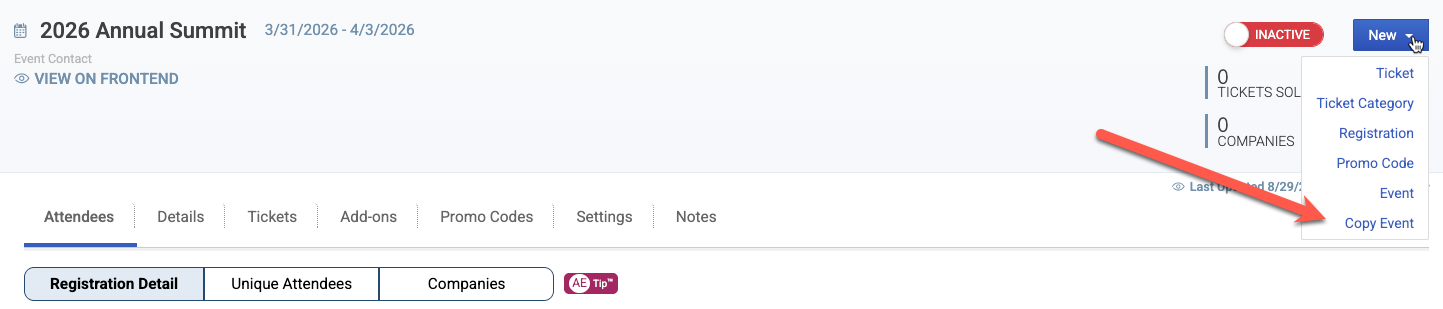
📋 Copy Events from the Event Detail Page
No need to back out to the event list view to copy an event! Events can now be copied directly from within the event on the backend. From the Event page, click the New button in the upper-right corner and select Copy Event from the dropdown menu.
✉️ Re-Send Event Summary Emails to Purchasers
You can now send Event Confirmation and Purchase Summary emails from the attendee list of an event. After selecting Send Event Confirmations from the batch actions button within an event, you’ll now see a modal with the additional option to send a Purchase Summary email to purchasers:
Attendee Confirmation Emails → send to selected attendees
Purchase Summary Emails → send to selected purchasers
Perfect for reminding purchasers about upcoming events.

🎟️ Draft Mode for Event Tickets
Tickets now start in Draft status by default. Draft tickets are hidden from members until you mark them as Active.
Previously, tickets were either Active or Inactive, and an event with inactive tickets couldn't be made open for registration on the frontend.
Now, an event itself can be Active while individual tickets remain in Draft mode. This gives you the flexibility to
Build tickets in advance without showing them to members.
Publish events early, then release tickets gradually.
Review or adjust ticket options internally before making them live.


💡 Clearer Labels in Novi Pay
We’ve sharpened up the language in Novi Pay! To reduce confusion, all references to “Transactions” in the Novi Pay section are now labeled as “Charges.” This makes it easier to differentiate Novi Pay charges from your main transactions list on the backend.
⚡ Quick Access to Novi Pay Deposit Details
No more waiting on QuickBooks! You can now click View from the Novi Pay Deposits list to instantly see payout details right inside Novi. This gives you a transparent look at exactly what’s included in each deposit: faster, clearer, and all without leaving Novi. Find it under Novi Pay → Balances → Action column.

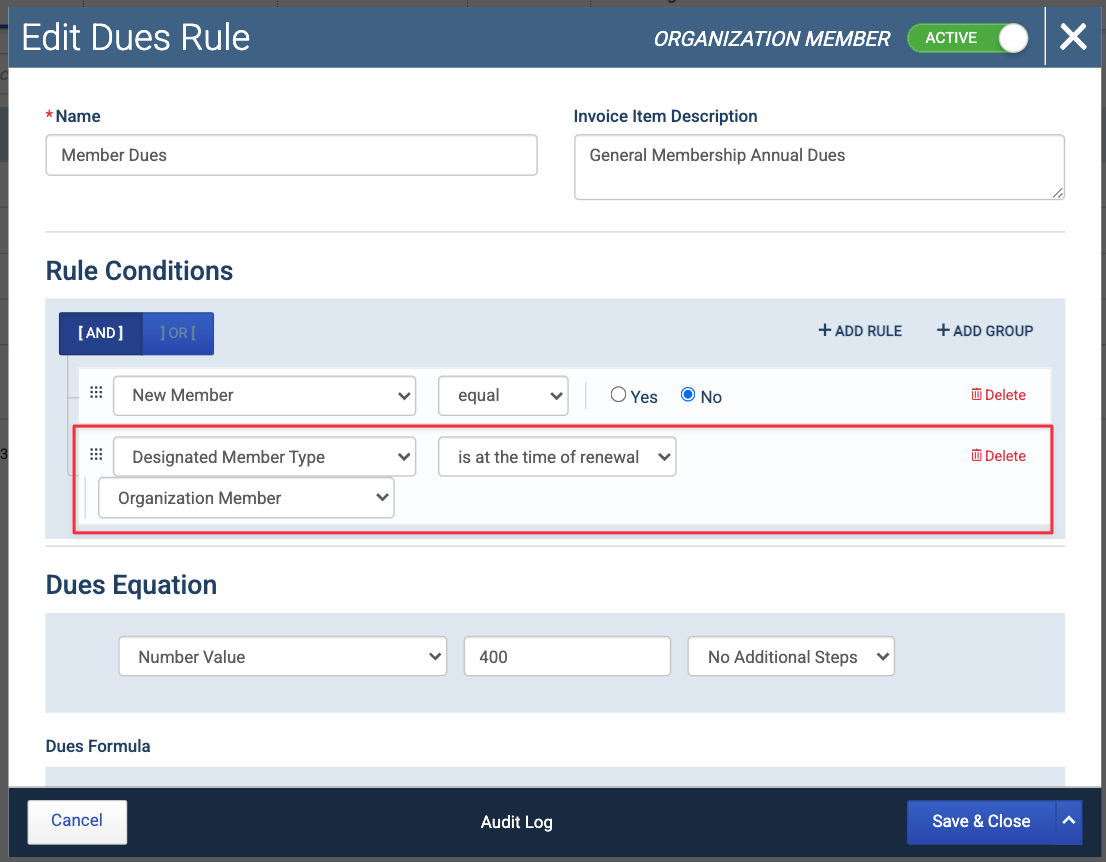
🎯 Smarter Dues Rules with Member Type History
We’ve added a new Designated Member Type Rule Condition that lets you set dues rules based on a member’s member type history, not just their current member type. This lets you tailor dues based on whether a member is, has been, or never was a certain type.
→ Learn More: Designated Member Type Rule Condition
🌍 Directory Phone Numbers Now Honor International Formatting
For associations with a global reach, accurate phone display matters. Directory profiles will now respect the international formatting stored on each record, so what’s in your database is exactly what members see.
Whether it’s a Japanese number, a UK mobile, or any other international format, the directory now showcases phone numbers just as intended. This ensures clarity for members around the world and keeps your directory professional and reliable.
🧾 Payment Processor Column in QuickBooks Sync
Troubleshooting where a payment originated just got easier. You can now add Payment Processor as a column in the Incoming QuickBooks Sync list using the settings cog. This is helpful if you're using Novi Pay, and still have members using saved cards from your previous payment processor.
